建立一個具備工具使用功能的對話系統,需要實作一個迴圈,持續呼叫 Claude,直到它不再要求使用工具為止。當 Claude 不再要求使用工具時,這表示它已經準備好給使用者最終的回應。
偵測工具請求
要知道 Claude 是否想要使用工具,關鍵在於回應訊息中的 stop_reason 欄位。當 Claude 決定需要呼叫工具時,這個欄位會被設定為 "tool_use"。這讓我們有一個簡潔的方式來檢查是否需要繼續對話迴圈:
python
if response.stop_reason != "tool_use":
    break  # Claude is done, no more tools needed
對話迴圈
主要的對話函式遵循一個簡單的模式:
python
def run_conversation(messages):
    while True:
        response = chat(messages, tools=[get_current_datetime_schema])
        add_assistant_message(messages, response)
        print(text_from_message(response))

        if response.stop_reason != "tool_use":
            break

        tool_results = run_tools(response)
        add_user_message(messages, tool_results)

    return messages
這個迴圈會持續進行,直到 Claude 提供最終答案且不再要求任何工具為止。
處理多個工具呼叫
Claude 可以在單一回應中請求多個工具。訊息內容包含一個區塊列表,我們需要分別處理每個工具使用區塊:
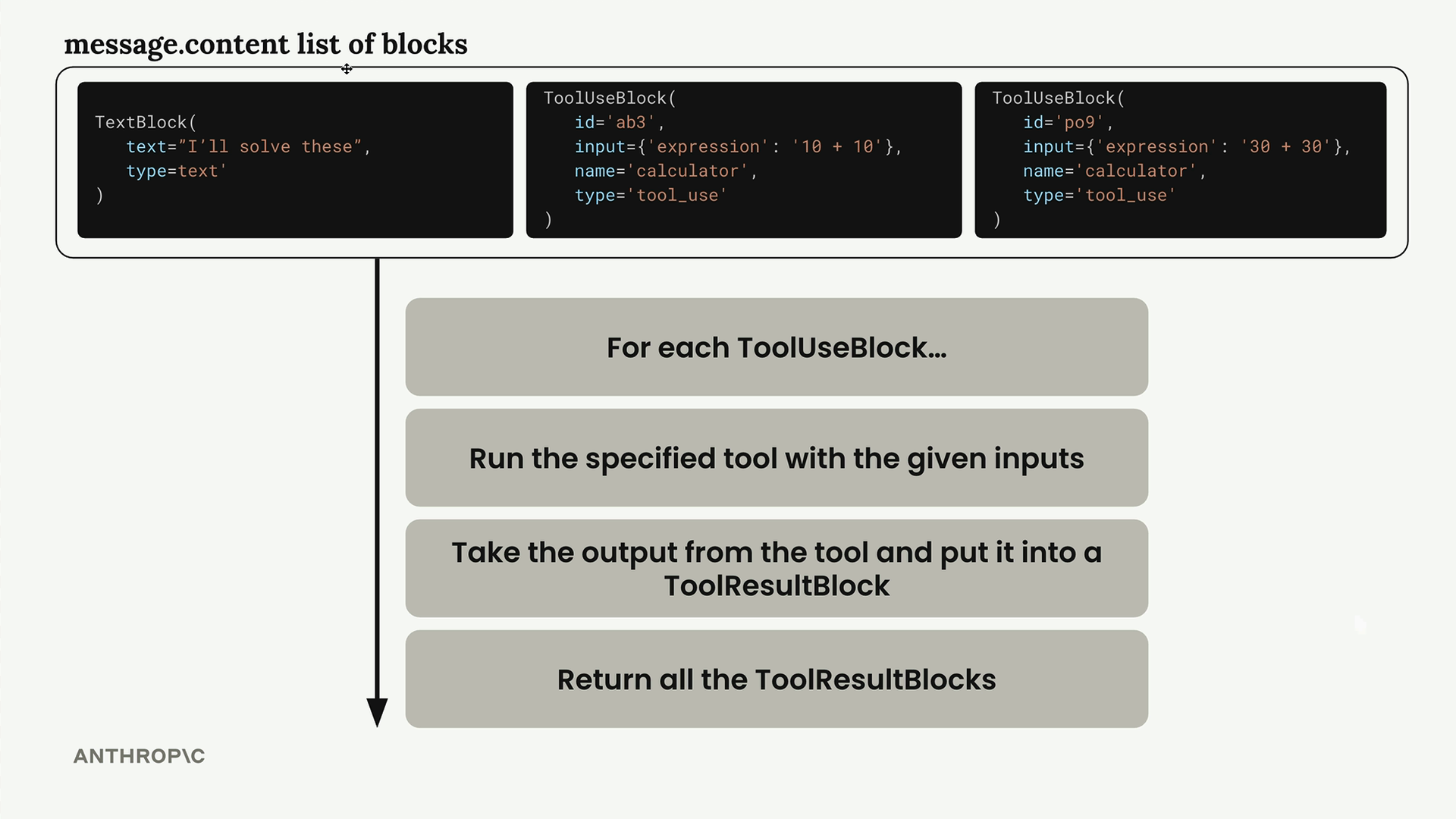
run_tools 函式透過篩選出工具使用區塊並逐一處理來處理這個情況:
python
def run_tools(message):
    tool_requests = [
        block for block in message.content if block.type == "tool_use"
    ]
    tool_result_blocks = []

    for tool_request in tool_requests:
        # 處理每個工具請求……
工具結果區塊
每個工具使用區塊都必須有對應的工具結果區塊來回應。它們之間的連結是透過相符的 ID 來維持的:
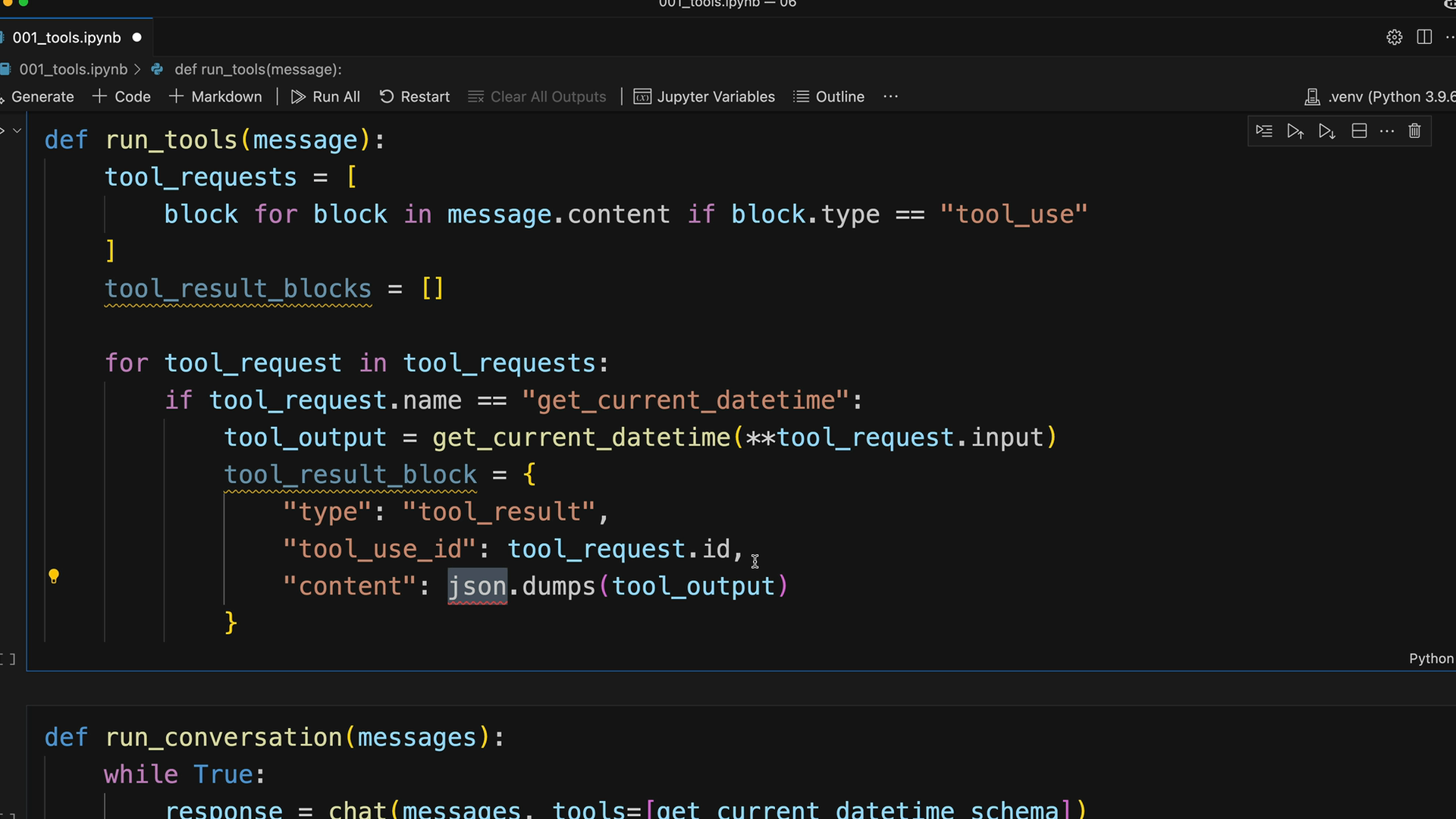
工具結果區塊的結構包括:
python
tool_result_block = {
    "type": "tool_result",
    "tool_use_id": tool_request.id,
    "content": json.dumps(tool_output),
    "is_error": False
}
錯誤處理
穩健的工具執行需要處理潛在的錯誤。當工具失敗時,我們仍然需要提供一個結果區塊給 Claude:
python
try:
    tool_output = run_tool(tool_request.name, tool_request.input)
    tool_result_block = {
        "type": "tool_result",
        "tool_use_id": tool_request.id,
        "content": json.dumps(tool_output),
        "is_error": False
    }
except Exception as e:
    tool_result_block = {
        "type": "tool_result",
        "tool_use_id": tool_request.id,
        "content": f"Error: {e}",
        "is_error": True
    }
可擴展的工具路由
為了支援多個工具,請建立一個路由函式,將工具名稱對應到其實作:
python
def run_tool(tool_name, tool_input):
    if tool_name == "get_current_datetime":
        return get_current_datetime(**tool_input)
    elif tool_name == "another_tool":
        return another_tool(**tool_input)
    # Add more tools as needed
這種方法讓新增工具變得容易,而不需要修改核心對話邏輯。
完整工作流程
完整的多輪對話運作方式如下:
- 將使用者訊息連同可用工具傳送給 Claude
- Claude 以文字和/或工具請求回應
- 執行所有請求的工具並建立結果區塊
- 將工具結果以使用者訊息的形式傳回
- 重複此過程,直到 Claude 提供最終答案
這創造了一種無縫的體驗,讓 Claude 能夠在多個回合中使用多個工具,以完整回答複雜的使用者請求。對話歷史維持了完整的上下文,讓 Claude 能夠在先前的工具結果基礎上,提供全面的回應。