Strict tool use: Stop rejecting your own calls
When your backend rejects a tool call that Claude itself produced, strict tool use is the fix. The video turns it on for one tool at Meridian, a fictional engineering consultancy, and runs the same 100 requests with it off and on.
The demo in this video was recorded in September 2026. It ran on Claude Haiku 4.5 (claude-haiku-4-5). Results may differ on newer models.
Claude usually follows a tool's input_schema, but nothing enforces it by default. So sometimes your backend rejects a tool call Claude made, because the call's input has one of these:
- The string
"2"instead of the integer2 - A missing required field
Strict tool use fixes this. One flag, strict: true, makes the input Claude writes match your schema.
At Meridian, an assistant uses the queue_stamp_request tool to queue drawing sets for a licensed engineer's stamp. Meridian's validator is the code that checks every tool call. With strict off, it rejects 79 of 100 requests. With strict on and the schema generated from the validator, it rejects none.
How strict tool use works
With strict: true, the API first compiles your JSON Schema into a grammar. A grammar is a set of rules that says which tokens may come next at each point in the input. Then, each time Claude picks the next token of the tool call, it can pick only a token that the grammar allows. This is called grammar-constrained sampling(opens in new tab).
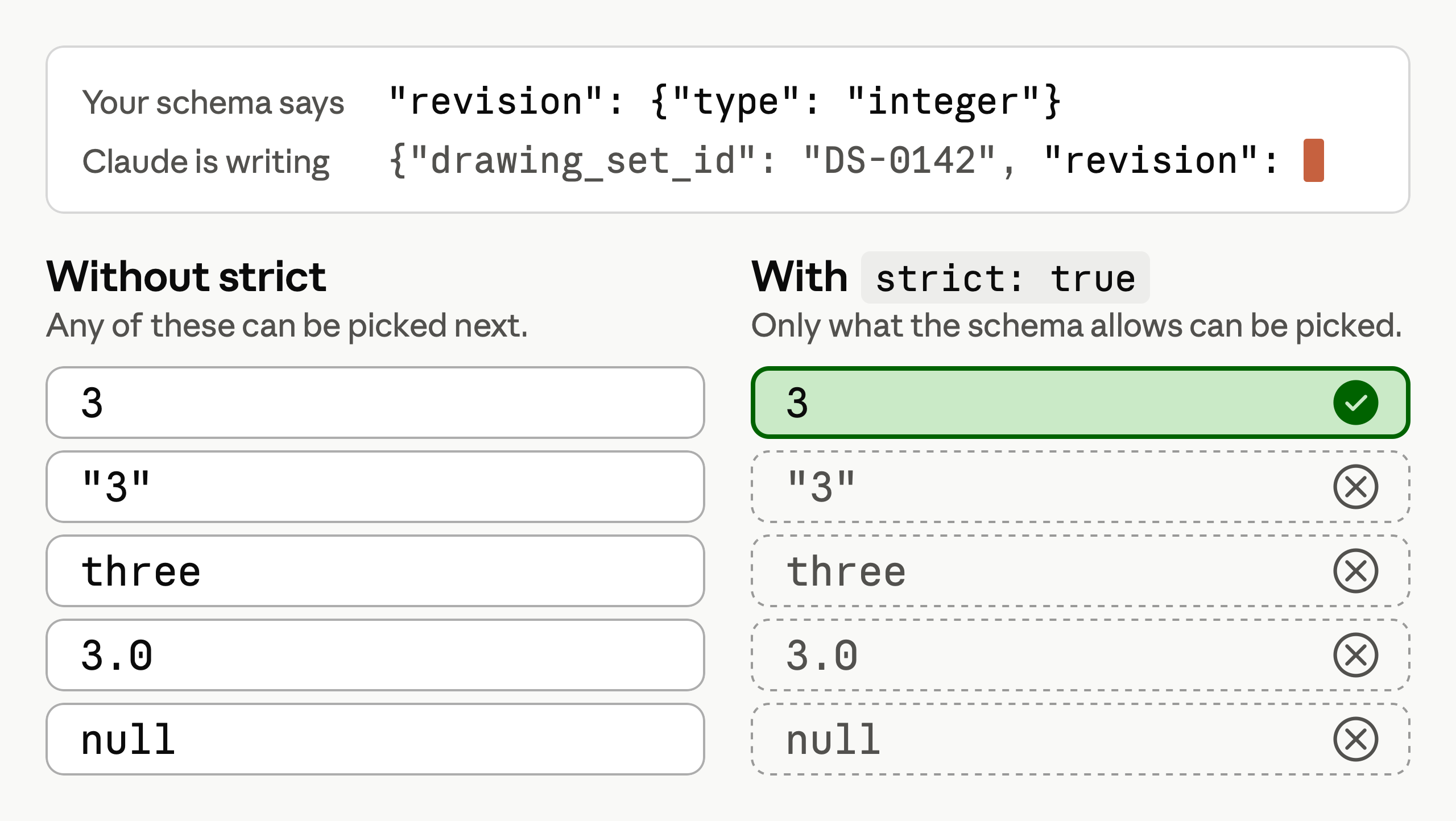
With strict: true, only tokens your schema allows can be picked, so an integer field gets an integer.
This is Meridian's tool definition, cut down. Strict needs two of its lines, the flag and a setting the flag requires.
{
  "name": "queue_stamp_request",
  "description": "Queues a drawing set for a professional engineer's stamp.",
  "strict": true,
  "input_schema": {
    "type": "object",
    "properties": {
      "drawing_set_id": {"type": "string"},
      "revision": {"type": "integer"}
    },
    "required": ["drawing_set_id", "revision"],
    "additionalProperties": false
  }
}
"strict": trueis the flag. It sits at the top level, besidename,description, andinput_schema, outside the schema."additionalProperties": falseis the setting. It means the input can't carry a field the schema doesn't name, and strict requires it on every object.
Build the schema from your validator
Strict tool use makes the input Claude writes match your schema, so the schema must say what your validator says. When you write the schema by hand, the two drift apart. A tool call can then match the schema and still be rejected. At Meridian, a handwritten schema made the license number a plain string with no pattern. So "PE 46196" passed the schema and failed the validator, which requires PE- and five digits.
Write the rules once, in your validator, and generate the schema from it. In Python the validator is usually a Pydantic class. In TypeScript it's usually written with Zod.
Below is Meridian's Pydantic class, StampRequest, with the code that uses it, then the schema that StampRequest.model_json_schema() returns. Each # ... stands for code not shown, and the schema shows only the license number.
class StampRequest(BaseModel):
    model_config = {"extra": "forbid"}
    # ...
    pe_license_number: str | None = Field(pattern=r"^PE-\d{5}$")
    # ...
stamp_tool = {
    # ...
    "input_schema": StampRequest.model_json_schema(),
    "strict": True,
}
stamp_request = StampRequest.model_validate(call.input){
"additionalProperties": false,
"properties": {
"pe_license_number": {
"anyOf": [
{"pattern": "^PE-\\d{5}$", "type": "string"},
{"type": "null"}
],
"title": "Pe License Number"
}
}
}"extra": "forbid"becomes"additionalProperties": false, the setting strict requires.str | NonebecomesanyOf, so the license number is a string with thatpattern, or null.model_validate()checkscall.input, the input Claude wrote, against the same class.
Compare the runs with strict off and on
Meridian's test sends 100 plain-language stamp requests to Claude Haiku 4.5 with the queue_stamp_request tool, and StampRequest validates every tool call. The same 100 requests run twice, first with a handwritten schema and strict off, then with the generated schema and strict on.
Replay both runs below.
The schema's pattern says what format is allowed, and strict makes Claude keep to it.
Strict controls the input's shape but can't supply a fact the request never gave. Of the 100 requests, 28 never mention a license. The generated schema allows null for the license number, and all 28 came back null.
Limits of strict tool use
Six things to know, as of October 2026:
- Keep protected health information (PHI) out. Compiled schemas don't get the same PHI protections as prompts and responses, so leave PHI out of property names,
enumvalues,constvalues, andpatternexpressions. - Bounds aren't supported. A request whose schema uses
minimum,maximum,minLength, ormaxLengthreturns a 400 error. Check bounds in a validator function, such as Pydantic's@field_validator, and state them in the field's description. - Limits add up across tools. One request can hold at most 20 strict tools(opens in new tab). Across those tools, it can hold at most 24 optional parameters. It can also hold at most 16 parameters that use
anyOfor a type array, which is what a nullable field likestr | Nonegenerates. - Input can still fail to match the schema. This happens after a refusal, when a response is cut off at
max_tokens, or when anenumorconststring comes back in different capitalization. - Some models reject a forced tool call. Setting
tool_choicetoanyortoolforces a tool call. That returns a 400 error on Claude Opus 5.5, Claude Sonnet 5.5, Claude Fable 5.1, and Claude Mythos 5.1. On those models, leavetool_choiceonauto, its default. - Programmatic tool calling can't use strict tools. In programmatic tool calling, Claude writes code that calls your tools. Lesson 8 covers it.
Key takeaways
strict: truemakes tool input match your schema, except after a refusal or a cut-off response, or when anenumorconststring changes case.- Generate the schema from your validator, such as a Pydantic class.
- Keep bounds out of the schema, and count tools, optional parameters, and nullable parameters across the whole request.