Parallel tool calling: Cut the latency
Claude can ask for several tools in one response, and your code can run them together. The video checks a job site for Meridian, a fictional engineering consultancy. One tool call at a time takes 19.9 seconds, while parallel tool calls take 10.8.
The demo in this video was recorded in September 2026. It ran on Claude Sonnet 5 (claude-sonnet-5). Results may differ on newer models.
Running tool calls one at a time makes your user wait for each one in turn.
When the tools that Claude wants don't depend on each other, it can ask for them all in one response. Claude does this by default, so your loop has to handle every tool call and send a result back for each one.
Three tool calls in one response
Parallel tool use means one response holds several tool_use blocks.
Meridian has a Python script that checks whether a job site is ready for fieldwork. The site check needs three lookups that don't depend on each other: the project's status, the weather at the site, and the state of the permit.
Here is Claude's response to Meridian's site check, with one tool_use block for each tool it wants.
{
  "role": "assistant",
  "stop_reason": "tool_use",
  "content": [
    {"type": "tool_use", "id": "toolu_01", "name": "get_project_status",
     "input": {"job_number": "MEG-2026-0142"}},
    {"type": "tool_use", "id": "toolu_02", "name": "get_site_weather",
     "input": {"site": "Riverside"}},
    {"type": "tool_use", "id": "toolu_03", "name": "get_permit_state",
     "input": {"permit_id": "P-88213"}}
  ]
}
The response's stop_reason is tool_use, and each tool call has its own id.
Run every tool call
A loop written for one tool call reads only the first tool_use block. It sends back one result, two tool calls never get theirs, and the API rejects the request. So collect every tool_use block in the response.
calls = [b for b in resp.content if b.type == "tool_use"]Next, run those tool calls at the same time. Each lookup spends most of its time waiting on another system. Give each one its own thread, and the three waits overlap instead of adding up.
with ThreadPoolExecutor() as pool:
    results = list(pool.map(run_tool, calls))
run_tool runs one tool call and returns its result, and the next two sections build it.
Running tool calls at the same time is usually safe when they only read data and don't depend on each other, like Meridian's lookups. When tools change data, or must go in a set order, it might be better to run them one after another.
Send every result back in one message
Once the three tool calls have run, Claude is waiting for their results. Each result goes back in a tool_result block, and its tool_use_id holds the id of the tool call it answers.
result = {"type": "tool_result", "tool_use_id": call.id}Every tool_use block gets one tool_result, and they all go in the next user message.
messages.append({"role": "assistant", "content": resp.content})
messages.append({"role": "user", "content": results})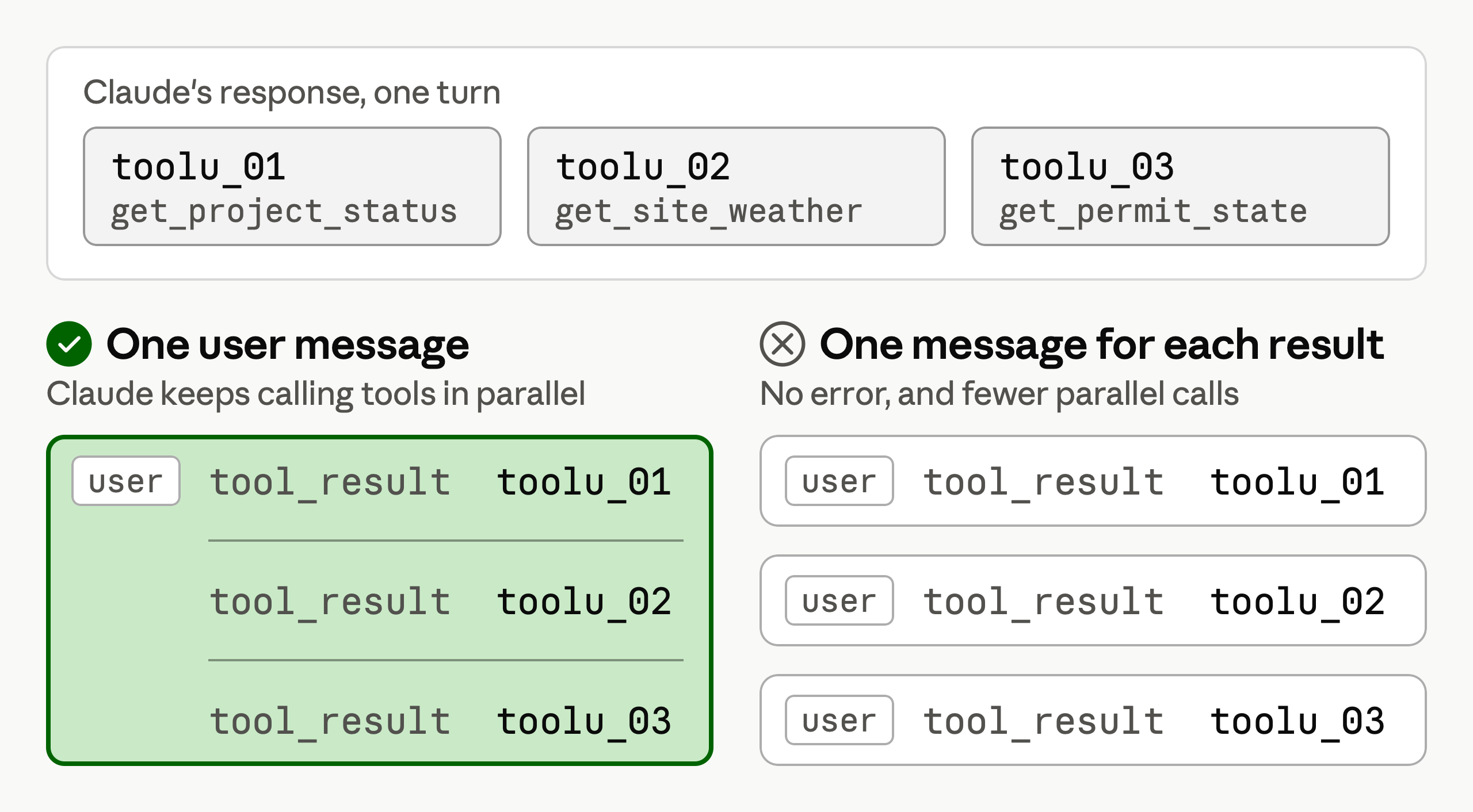
One user message with all three results keeps Claude calling tools in parallel.
If your loop sends each result in its own message instead, the conversation reads as if Claude had asked for one tool at a time. That is a common reason Claude makes fewer parallel tool calls.
Return an error result for a bad tool call
Running three tool calls at once means one can fail while the other two succeed. If your code raises an exception and nothing catches it, your loop stops, and the two good results are lost with it.
So send the failure back as a result. It's an ordinary tool_result with the error message as its content, plus is_error: true. The message should say what went wrong and what Claude should try next.
try:
    result["content"] = HANDLERS[call.name](**call.input)
except Exception as exc:
    result["content"] = f"{call.name} failed: {exc}"
    result["is_error"] = True
HANDLERS is a dict from tool names to the Python functions that do each tool's work. Each function returns a string, because a tool_result's content is a string or a list of content blocks.
Put the loop together
The snippets above fit into Meridian's loop below. The script has already set up client, tools, prompt, and HANDLERS.
Key takeaways
- Run every tool call in a response, and run them at the same time when they don't depend on each other.
- Send back one
tool_resultfor each tool call, and put them all in one user message. - Don't send each result in its own message, because that reduces parallel tool use.
- Send a failure back as a result with
is_error: true, so one bad tool call doesn't stop the loop.