공식 Python SDK를 사용하면 MCP 서버를 구축하는 작업이 훨씬 간단해집니다. 도구를 위한 복잡한 JSON 스키마를 직접 작성하는 대신, SDK가 데코레이터와 타입 힌트를 통해 그 모든 복잡성을 대신 처리해 줍니다.
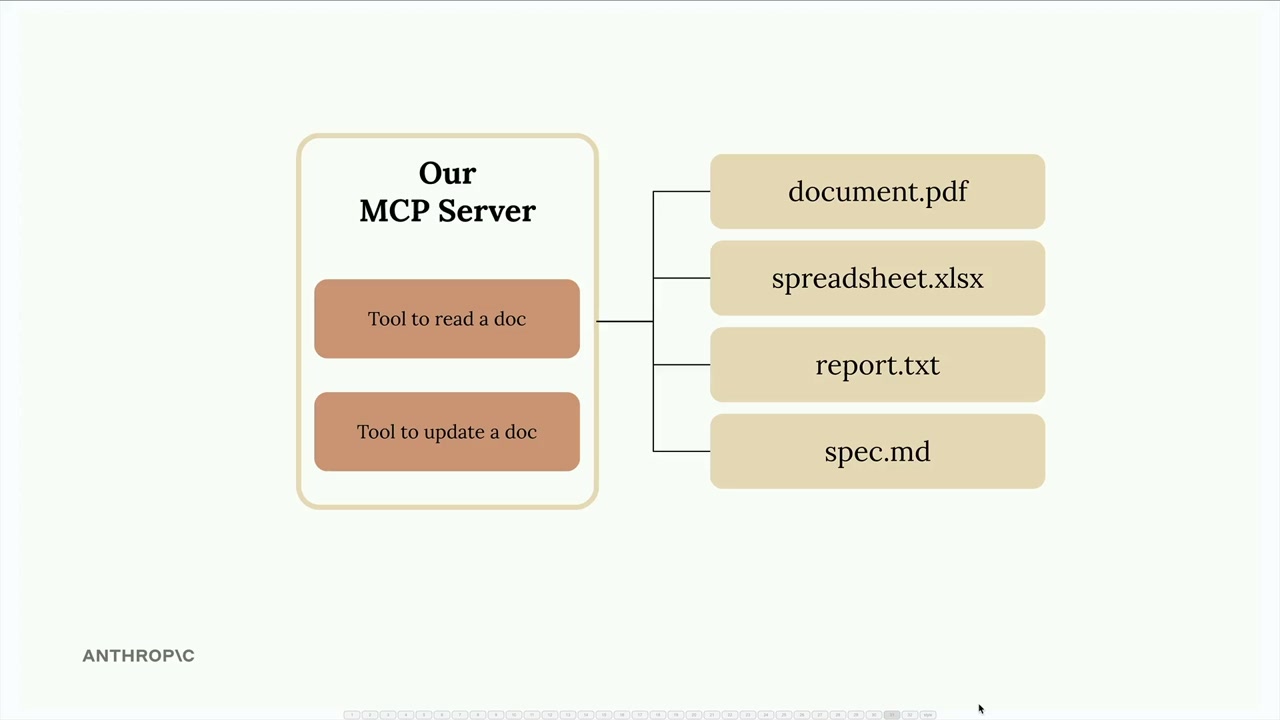
이 예제에서는 메모리에 저장된 문서를 관리하는 MCP 서버를 만들어 보겠습니다. 이 서버는 두 가지 필수 도구를 제공합니다. 하나는 문서 내용을 읽는 도구이고, 다른 하나는 찾기-바꾸기 작업을 통해 문서를 업데이트하는 도구입니다.
MCP 서버 설정하기
Python MCP SDK를 사용하면 서버 생성이 매우 간단해집니다. 단 한 줄로 완전한 MCP 서버를 초기화할 수 있습니다:
from mcp.server.fastmcp import FastMCP
from pydantic import Field

mcp = FastMCP("DocumentMCP", log_level="ERROR")
이 구현에서는 문서가 간단한 Python 딕셔너리에 저장되며, 키는 문서 ID이고 값은 문서 내용을 담고 있습니다:
docs = {
    "deposition.md": "This deposition covers the testimony of Angela Smith, P.E.",
    "report.pdf": "The report details the state of a 20m condenser tower.",
    "financials.docx": "These financials outline the project's budget and expenditure",
    "outlook.pdf": "This document presents the projected future performance of the",
    "plan.md": "The plan outlines the steps for the project's implementation.",
    "spec.txt": "These specifications define the technical requirements for the equipment"
}
데코레이터를 사용한 도구 정의
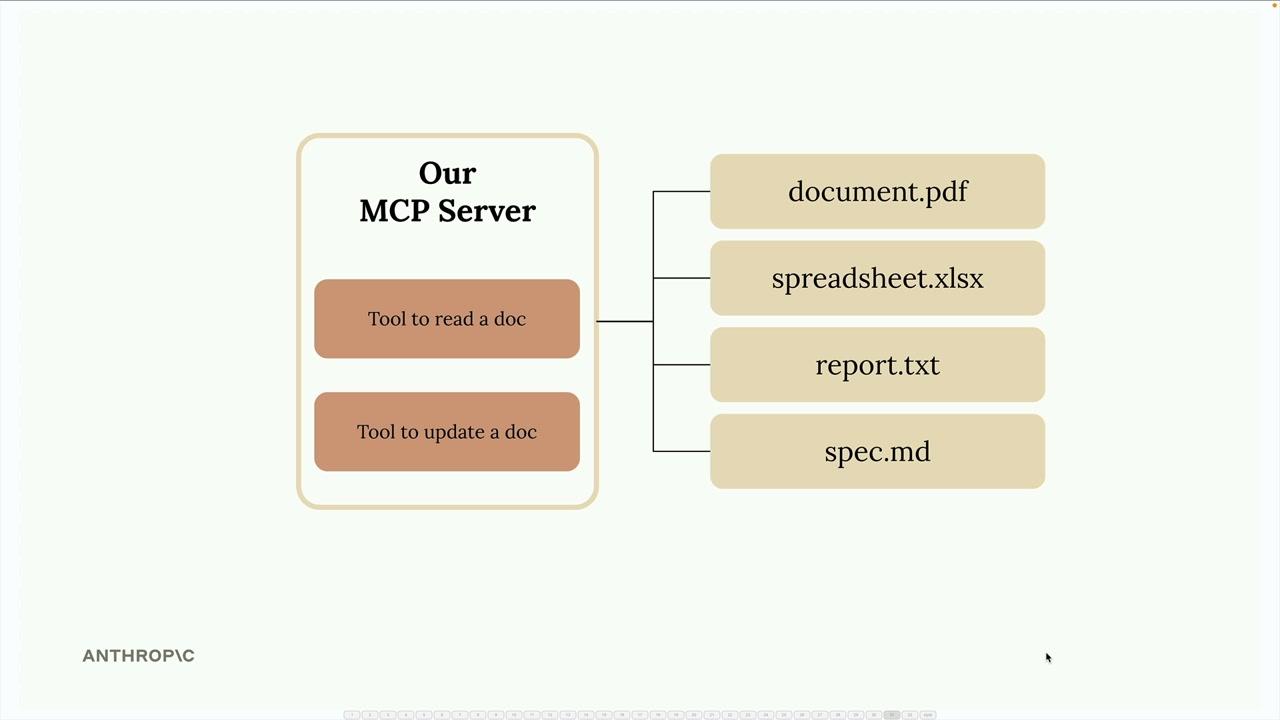
SDK는 도구 생성 과정을 장황한 작업에서 깔끔하고 읽기 쉬운 작업으로 바꿔줍니다. 긴 JSON 스키마를 작성하는 대신, Python 데코레이터와 타입 힌트를 사용합니다.
문서 읽기 도구 만들기
첫 번째 도구는 Claude가 ID를 통해 모든 문서를 읽을 수 있게 해줍니다. 전체 구현은 다음과 같습니다:
@mcp.tool(
    name="read_doc_contents",
    description="Read the contents of a document and return it as a string."
)
def read_document(
    doc_id: str = Field(description="Id of the document to read")
):
    if doc_id not in docs:
        raise ValueError(f"Doc with id {doc_id} not found")

    return docs[doc_id]
@mcp.tool 데코레이터는 Claude에게 필요한 JSON 스키마를 자동으로 생성합니다. Pydantic의 Field 클래스는 각 인자가 무엇을 기대하는지 Claude가 이해하는 데 도움이 되는 매개변수 설명을 제공합니다.
문서 편집 도구 구축하기
두 번째 도구는 문서에 대해 간단한 찾기-바꾸기 작업을 수행합니다:
@mcp.tool(
    name="edit_document",
    description="Edit a document by replacing a string in the documents content with a new string."
)
def edit_document(
    doc_id: str = Field(description="Id of the document that will be edited"),
    old_str: str = Field(description="The text to replace. Must match exactly, including whitespace."),
    new_str: str = Field(description="The new text to insert in place of the old text.")
):
    if doc_id not in docs:
        raise ValueError(f"Doc with id {doc_id} not found")

    docs[doc_id] = docs[doc_id].replace(old_str, new_str)
이 도구는 세 가지 매개변수를 받습니다: 문서 ID, 찾을 텍스트, 그리고 대체할 텍스트입니다. 구현은 단순성을 위해 Python의 내장 문자열 replace() 메서드를 사용합니다.
오류 처리
두 도구 모두 Claude가 존재하지 않는 문서를 요청하는 경우를 처리하기 위한 기본적인 오류 처리를 포함하고 있습니다. 유효하지 않은 문서 ID가 제공되면, 도구는 Claude가 이해하고 그에 따라 조치를 취할 수 있는 설명적인 메시지와 함께 ValueError를 발생시킵니다.
SDK 접근 방식의 주요 이점
- Python 타입 힌트로부터 자동 JSON 스키마 생성
- 유지보수가 쉬운 깔끔하고 읽기 쉬운 코드
- Pydantic을 통한 내장 매개변수 검증
- 수동 스키마 작성에 비해 줄어든 보일러플레이트
- 개발을 위한 타입 안전성과 IDE 지원
MCP Python SDK는 과거에는 복잡한 과정이었던 도구 정의 작성을 Python 개발자에게 자연스럽게 느껴지는 작업으로 바꿔줍니다. 여러분은 비즈니스 로직에 집중하고, SDK가 프로토콜 세부 사항을 처리합니다.