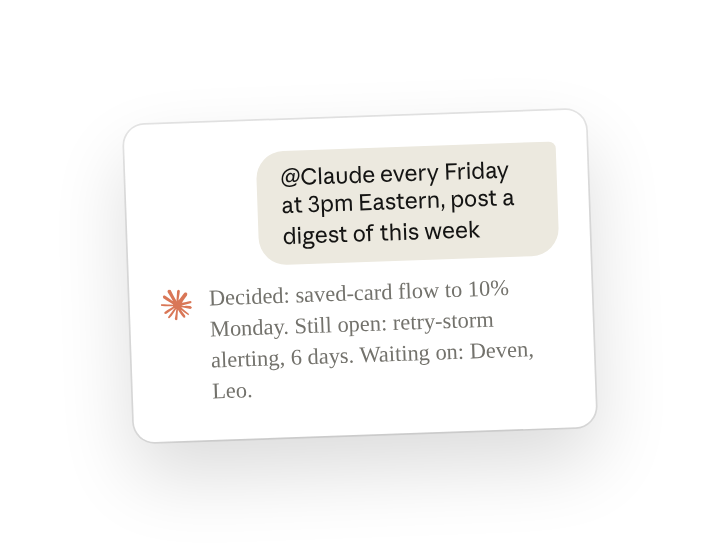
When you need to assemble a weekly status, most of it is already written down somewhere. The decisions are in the week's threads, and the open items are in the tracker. The work is collecting them and checking the threads against the tracker.
With Claude Tag in the team's channel and the tracker connected, set up a routine(opens in new tab). Claude does that gathering on a schedule and posts the draft in the channel. There, anyone on the team can reply to correct it(opens in new tab) before the project lead forwards it on.
Set up
What to ask Claude, and what it does
Send this once in your team's channel. Every week after that, Claude posts a digest built from the channel's threads and the tickets and pull requests linked in them. Set the day, time zone and sections your team wants. You can add more sources later with another message, such as another channel or the week's merged pull requests.
Claude posts the digest every Friday until someone in the channel changes or pauses the routine.
Before you forward the post, open the ticket behind anything listed as still open and confirm its state.
Follow ups
Tailor Claude's response in any specific way you need
Anyone in the channel can reply under the post to correct it or to ask Claude to watch one item, and Claude includes that in the next digest (reply in the thread to steer(opens in new tab)). To learn more on effectively applying and managing agents like Claude Tag with your team, visit our Introduction to Claude Tag(opens in new tab) course.
Add another channel or tool to what the digest reads
Anyone in the channel can change what a routine covers by describing the change, and Claude applies it from the next run (manage standing work(opens in new tab)).
See the channel's routines
Claude lists a channel's routines when asked, with the day and time it scheduled for each. Check those times to confirm the time zone.
Stop the weekly digest
Anyone in the channel can stop a routine by naming it, and one message sets it up again later.
Related resources
- Learn more in the Introduction to Claude Tag(opens in new tab) course.
- Get started with Claude Tag(opens in new tab): add @Claude to a channel and see what it can read there.
- Set up routines(opens in new tab): the Claude Tag docs page this use case is based on.