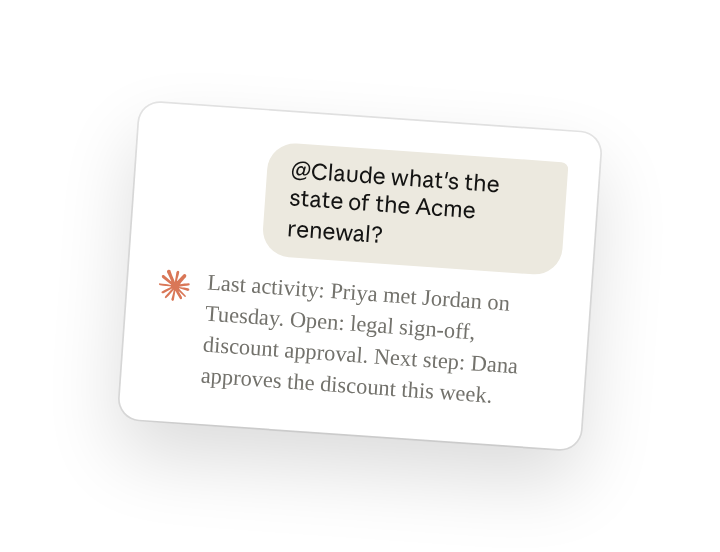
A team working on a deal can ask for its status in their own channel and get an answer built from the CRM record and from what the team has said about the account there.
With the CRM connected to the channel, Claude Tag answers in the thread, so everyone on the account reads the same answer(opens in new tab). The answer says which part came from the record and which from the conversation. With the same connection, Claude can brief you before a call, or post a pipeline review every Monday as a routine(opens in new tab).
Set up
What to ask Claude, and what it does
Ask in the account's channel, each time you have a question about that account or one of its deals. Name the information you want, such as recent activity, open items or where the deal stands.
A call from yesterday may not be logged yet, so check the last activity in the record before you pass the answer on.
Follow ups
Send the last three follow-ups below in your team's sales channel, which has the same CRM connection.
Correct a detail in the answer, and have Claude remember it for the channel
Claude revises its answer when someone corrects a detail in the thread, such as Jordan's role. If the same mistake could happen again, ask it to remember the correction for the channel (channel memory(opens in new tab)):
Get a pipeline digest on a schedule
Claude can post a digest from the CRM every week (routine(opens in new tab)). Anyone in the channel can later list or disable it by name.
Ask which deals are stuck
Claude can query the CRM for deals at a stage and how long each has been there.
Get a brief before a call
Claude can combine the CRM record with what the team has said in the channel into one brief, posted in a thread where you can ask follow-up questions.
Tips
Use the same names your tools use
Claude matches the stage and field names your CRM uses. If yours calls stage 3 "Proposal", write "Proposal".
If Claude can't find a record, check if the tool is correctly connected to the channel
Claude sees only the CRM data that the login your admin connected can see. If a customer you expect is missing, ask @Claude what can you access from this channel?, then ask your admin to check that connection(opens in new tab).
Related resources
- Learn more in the Introduction to Claude Tag(opens in new tab) course.
- Get started with Claude Tag(opens in new tab): add @Claude to a channel and see what it can read there.
- Pull deal and account state(opens in new tab): the Claude Tag docs page this use case is based on.