Set up
Try a plugin
The Finance plugin ships with /close-management and seven other close-week skills as a starting point, already structured to compare records across sources and categorize the gaps. If your admin manages plugins and it's not available yet, skip this; nothing below requires it.
Connect your tools
Claude Cowork is more powerful when it works directly with your systems. You control permissions and access. Learn about tool access(opens in new tab).
Navigate to Customize → Connectors in Cowork to set up.

Set your working folder
Drag the files you'll use (the Workday export, the headcount plan, the payroll register) into one folder and point Cowork at it. Cowork reads from it and writes the reconciliation back to it. Create a Cowork project(opens in new tab) from your headcount folder so the cost-center map and FTE-vs-contractor rules stay attached every month.
The prompt
Copy this into Claude Cowork
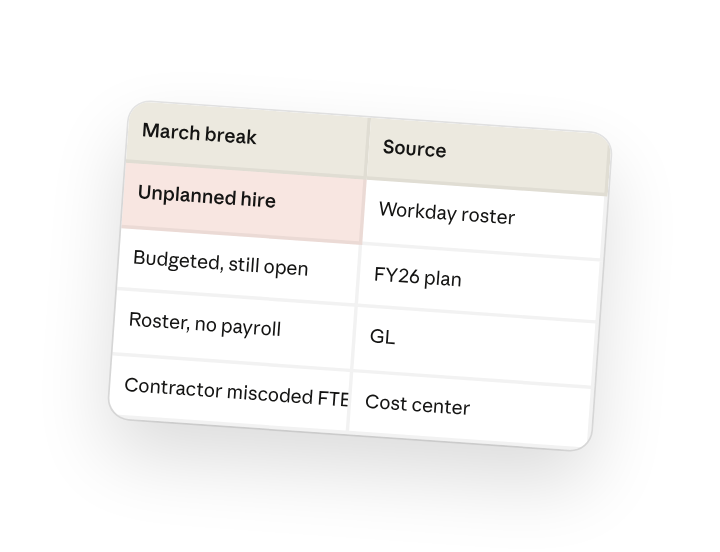
Reconcile March headcount across the Workday roster, the FY26 plan, and payroll in the GL. Match by cost center and employee ID, list every difference (unplanned hires, budgeted heads still open, roster entries with no payroll, contractors miscoded as FTE), and write the reconciliation by cost center to the close folder.
Why this works
Say how to match the records. Naming HRIS, plan, and GL with "by cost center and employee ID" tells Cowork exactly how the three tables join.
List the categories you want. Hired-not-planned, open reqs, ghost roster, miscoded contractors are the four answers your business partners need; the recon comes back already tagged.
Organize output for the reader. The output rolls up the way budget owners are accountable, so it's ready to forward.
Put reference files in the folder. Your cost-center crosswalk handles the cases where HRIS and the GL use different codes.
Get a better draft
Ask for cost impact. "Show the loaded-cost impact of each break" turns a count into a number leadership reacts to.
Ask what changed. Add "compare to last month's recon and highlight new breaks" so you're chasing only what moved.
Make Cowork work for you
A plugin skill is a starting point — customize it with your own practices and expertise. A few minutes of conversation and it runs with your standards from then on.
Make what we've done in this task so far into a skill, or edit the /close-management skill with my feedback.
Make it repeatable
Run it on a schedule
Headcount ties on the same day every close. Type /schedule in the prompt, or open Scheduled in the Cowork sidebar, and the customized skill runs against the newest roster and payroll automatically.
/schedule Every Monday at 9am, if a new Workday export is in FY26-Close/Headcount, reconcile headcount across that export, the FY26 plan, and the payroll register, and write the by-cost-center recon there.
Ties Workday roster, the FY26 plan, and the payroll register by cost center and writes the categorized break list to the close folder.
Share with your teammates
Your customized skill now carries your cost-center map, your break categories, and your loaded-cost assumptions. Share it so HR, FP&A, and Accounting all reconcile from the same definition of a head.