Set up
Try a plugin
The Engineering plugin ships with /debug already wired to read a Cost Explorer or BigQuery billing export, baseline it, and group the deltas by tag. If your admin manages plugins and it's not available yet, skip this; nothing below requires it.
Connect your tools
Claude Cowork is more powerful when it works directly with your systems. You control permissions and access. Learn about tool access(opens in new tab).
Navigate to Customize → Connectors in Cowork to set up.


Set your working folder
Drop the billing CSV (or point at the export bucket), your tag-to-team mapping, and last quarter's report into one folder so Cowork has the baseline and the ownership map. The anomaly report and the per-team breakouts get written back here. Create a Cowork project(opens in new tab) from the folder so your thresholds and known-okay exceptions persist month to month.
The prompt
Copy this into Claude Cowork
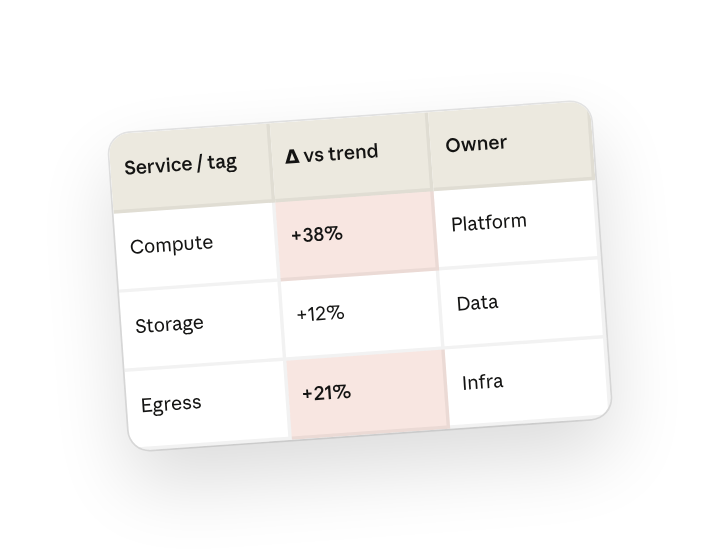
Compare this month's AWS costs to the trailing three-month average by service and tag:team. Flag any line more than 20% over trend, trace each to the workload or change behind it, and write the cost-anomaly report with an owner and recommended action for every item. Put a one-line summary for the infra channel at the top.
Why this works
Set the comparison baseline. One month is noise; three months is a baseline.
Set the threshold. "More than 20% over" turns a wall of numbers into a short list worth reading.
Ask for what caused each anomaly. "Likely cause and owning team" is what makes a finding useful — so each anomaly includes where it came from and who to talk to about it.
Include who owns what. Every anomaly has an owner, so the report is a to-do list, not an FYI.
Get a better draft
Add an example to match. Drop an example you like into the folder and Cowork matches your structure and voice.
Ask it to flag uncertainty. Add "flag anything you're not confident about" so you know where to look first when you review the draft.
Finish it where the file lives

Make Cowork work for you
A plugin skill is a starting point — customize it with your own practices and expertise. A few minutes of conversation and it runs with your standards from then on.
Make what we've done in this task so far into a skill, or edit the /debug skill with my feedback.
Make it repeatable
Run it when the bill closes
The report should be waiting before anyone opens the console. Type /schedule in the prompt, or open Scheduled in the Cowork sidebar, and the customized skill runs against the new export as soon as the month closes.
/schedule Every Monday at 7am, if a new month's billing export is in Infra/cloud-cost, run /debug against it, write the anomaly report to that month's folder, and post the one-line summary to #infra-cost.
Runs /debug on the closed month, writes the ranked anomaly report to the dated folder, and posts the headline to the infra channel.
Share with your teammates
Your customized /debug now knows your tag scheme, your threshold, and the spikes you've already accepted. Share it so any infra engineer can run the same analysis mid-month when something looks off.