A long Claude Code task often outlasts the time you have at your desk. Say Claude is an hour into a refactor in your terminal when you have to leave. The work isn't finished, and Claude may still need a decision from you before it can go on.
Remote Control and a cloud session are two ways to keep that work moving while you're away. With Remote Control, the session keeps running on your machine and you steer it from your phone or a browser. A cloud session runs on cloud infrastructure instead of on your machine. Which one fits depends on the task, and a few questions about the task settle it.
A long task that has to outlive your local session
In a local session, everything happens in one terminal. Claude runs there, on your machine, and you read its progress and answer its questions there too. A long task, such as a refactor across dozens of files, can run for hours, and you can't sit at that terminal the whole time.
For a task like that to finish, the work has to keep running after you walk away. You also need a way to check on it and answer Claude from somewhere else. Remote Control and a cloud session both let you check in from your phone or a browser. They differ in where the work runs, and that decides what Claude can reach while you're away.
What you get out of Claude depends mostly on what you put in front of it. On a short task, you notice a missing file or tool right away and supply it. On a long task, Claude works for hours with whatever it can reach. So before you work on the prompt's wording, ask what Claude will need for the task and where those things live.
What each one gives you, and where it stops
The key difference is where the session runs. With Remote Control, Claude keeps running locally the entire time, and the web and mobile interfaces are a window into that local session. With a cloud session, the work runs in a cloud VM that starts from a fresh clone of your repository.
To picture the difference, imagine a colleague who takes over your work for the evening. With Remote Control, they sit at your desk while you phone in. They can open every drawer, but they stop if the office closes. With a cloud session, they work in another office that stays open, with only the folder you sent.
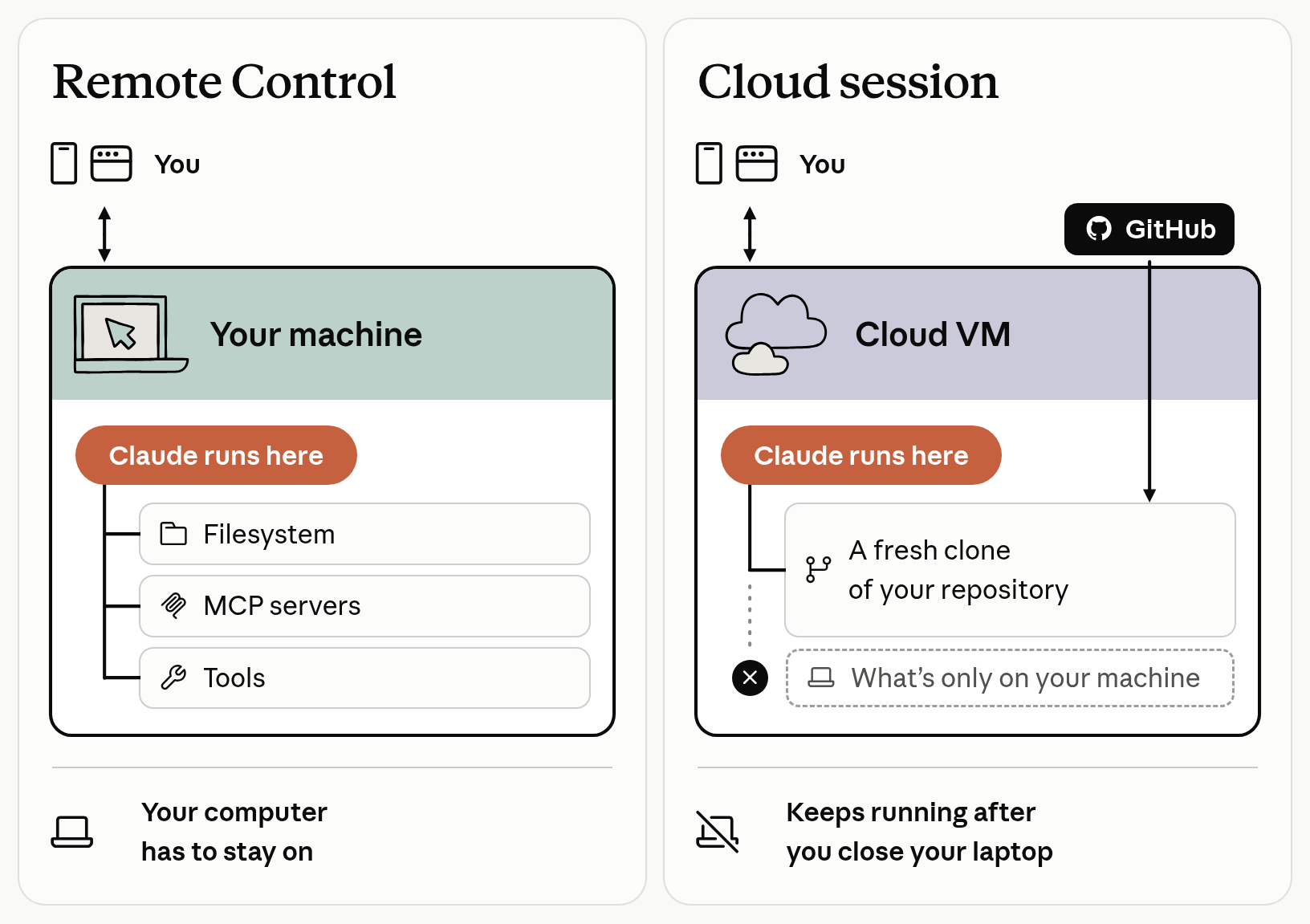
With Remote Control, Claude runs on your machine and can reach your local environment. A cloud session runs in a cloud VM that starts from a fresh clone of your repository.
What you get from each one
Where the session runs decides what Claude can reach and what happens when you close your laptop.
| Remote Control | Cloud session | |
|---|---|---|
| What Claude can reach | Your full local environment. Your filesystem, MCP servers, tools, and project configuration all stay available. | Anything you've committed to the repo, including the repo's CLAUDE.md. |
| When your laptop sleeps or closes | Claude Code reconnects automatically when your machine comes back online. | The session keeps running, and you can check on it or steer it from any device. |
| Best for | You're in the middle of local work and want to keep going from another device. | You want to start a task without any local setup, work on a repo you don't have cloned, or run multiple tasks in parallel. |
Where each one stops
Each one keeps working only while certain conditions hold.
| Remote Control | Cloud session | |
|---|---|---|
| What it depends on | Your computer has to stay on, and the claude process has to keep running. | GitHub. Repository cloning in Anthropic-hosted environments and pull request creation both require it. |
| What stops it | If you close the terminal or stop the claude process, the session goes offline. | It stops after a period of inactivity, and its VM is reclaimed. Reopening it restores your conversation history, but background work that was still running is gone. |
| Who can use it | Pro, Max, Ultra, Team, and Enterprise plans. API keys aren't supported. On Team and Enterprise, an Owner must first enable the Remote Control toggle in Claude Code admin settings. | Pro, Max, Ultra, and Team plans, and Enterprise users with premium seats or Chat + Claude Code seats. |
The cloud session has one more limit, which comes from the fresh clone. Whatever lives only on your machine stays behind. Look for these before you pick a cloud session:
- Uncommitted changes and local commits you haven't pushed. From the terminal, the cloud VM clones your current directory's GitHub remote at your current branch. It doesn't copy your local checkout, so push first.
- MCP servers you added at local or user scope, which are saved in
~/.claude.jsonon your machine. - An interactive sign-in such as AWS SSO. It requires a browser-based login that can't run in a cloud session.
- Services the cloud VM isn't allowed to call. Network access is limited by default.
To close a gap, push your commits and commit your own configuration to the repo. The full list of what carries over from your setup(opens in new tab) covers the rest.
A few questions that decide it
Ask these questions about your task, then pick the option your yeses point to.
-
Is the work already under way in a terminal session? A yes points to Remote Control. Run
/remote-controlin that session to continue it from your phone or a browser. From the terminal, you can't push an existing session to the cloud. -
Does the task need something that exists only on your machine? A yes points to Remote Control, where your full local environment stays available.
-
Will you have to close or shut down your computer before the task is done? A yes points to a cloud session, which keeps running after you close your laptop.
-
Do you want several tasks at once, or a task on a repo you haven't cloned? A yes points to a cloud session. It needs no local setup, and you can run multiple tasks in parallel.
If a task needs something on your machine and your machine can't stay on, neither option fits yet. If what it needs is code or configuration, push it to the repo and use a cloud session. If it's a database on your laptop or an interactive sign-in, find a way to leave the computer on.
Check your pick before you leave
Test the pick against whatever would stop it. For Remote Control, make sure the computer will stay on, then open the session in the Code tab of the Claude app. For a cloud session, run git status and push what the task needs before you start the session with claude --cloud followed by a description of the task.
Pick for these tasks
For each long task below, find the sentence that decides between Remote Control and a cloud session, then pick the option it points to. After you pick, you'll see the deciding sentence and the option that fits, with the reason.
The deciding sentence states a fact that one of the questions above asks about. A sentence that's true with either option decides nothing. For example, you can steer the work from your phone either way.
What to remember
Remote Control keeps the work on your machine, and a cloud session runs it in a cloud VM from a fresh clone of your repository.
Pick Remote Control when the work is already under way on your machine, or when it needs something only your machine has. Your computer has to stay on, and the claude process has to keep running.
Pick a cloud session when everything the task needs is in your GitHub repository and your computer can't stay on. It also fits when you want several tasks at once, or a task on a repo you haven't cloned.
Before you leave any long task running, list what Claude will need for it and check where each thing lives. Do the same for any work you hand to Claude and won't be watching.
To set one up, follow the Remote Control guide(opens in new tab) or the cloud session quickstart(opens in new tab).
Each person below made a choice for a long task. Say what happens next.
Priya's last three commits are on her laptop, and she hasn't pushed them to her GitHub repo, which has the Claude GitHub App installed. She wants Claude to write tests for that work while she's at a conference. She starts a cloud session from her terminal and shuts the laptop. What will she run into?
Claude is drafting release notes from 300 merged pull requests, in a terminal on Sam's desktop computer. Sam turns on Remote Control. Before he leaves, he quits the terminal app and leaves the computer on. On the train, he opens the Claude app to check on the work. What will he find?
Nina's cloud session started a long test run in the background. Then the session stopped after a period of inactivity, with the test run still going. Later, Nina reopens the session. What will she find?