Developers working with Claude Code will eventually run into a cost or usage constraint. Still, developers want to work on the frontiers of model intelligence and often default to the most capable model available.
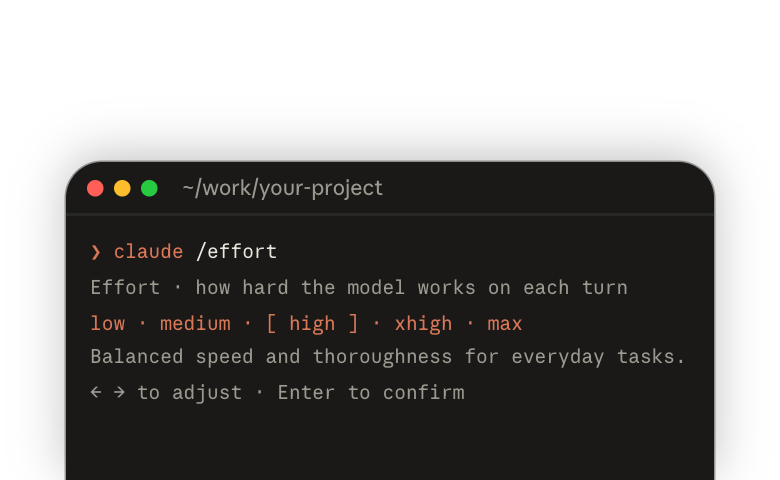
No matter which model you are using, another important dial for cost and token usage is the effort level. Match the effort to the complexity of the task; cost is what happens when you do not, in either direction.
Effort does not change what the model knows
Effort tells your model how many resources to spend on the task in your prompt. If you set effort to the lowest level, the model will try to achieve the objectives of the prompt with as few resources as possible: fewer tool calls, fewer tokens, and less work overall. If you set effort to the maximum, you are signaling to the model that it can and should use as many resources as it needs to complete the objectives in the prompt.
Effort sets how hard the model works, not how much it knows. The model you choose determines the level of capability you are working with. Effort is a signal of how hard you want that model to work.
When to change the effort
When the effort is too low for the task, the model will likely stop early and come back to you with unfinished work. That is a signal that what you asked is more complex than the effort you allowed for. Then you have to figure out where it left off and prompt again to get it to continue. In the end that can cost more than if you had set the effort level correctly.
When the effort is too high, you may not notice it on every prompt or every task: the model will use more tokens than necessary, the response times will be longer, and you will notice a pattern of overthinking, or of identifying more tasks than you actually assigned. You are sending the signal "what I am describing to you is really complex and difficult," and the model will match that signal and treat the work as that complex.
The default sits in the middle, and it is not arbitrary: it is tuned for each model to the level where most tasks finish without overspending. That is why it is the right place to start.
You adjust down for tasks that you know are simple and should not require a big spend of resources: time, turns, tool calls, or document reads. If you have already run this type of task at the default level, try running it one level lower and see if you notice any difference in quality. If not, keep going down one level at a time until you do.
You go up from the default when you know you are describing something that should take a long time and require a lot of turns and double-checking. The other time to turn the effort up is when the task is something you cannot quickly check yourself, and you want more self-checking from the model as it works. The same rule applies in this direction: go up one level, rerun, and stop when it starts finishing the things you think it should.
Which dial to turn: effort or model?
Change the model only if more effort did not fix the problem. Did the model not know enough, or did it not try hard enough? If it knew enough but did not try hard enough, change effort. If it knew enough but worked too hard, that is also an effort problem. If changing the effort is not fixing it and you are not on the most capable model, that is a sign the model you picked does not have the knowledge, or is not capable enough, for the task.
When you change models, start again at the default
The level names are the same on every model, but the same level does not mean the same amount of work on a different model.
Whenever you choose a model, start the effort at the default and adjust up and down as you need to. Say you try a difficult task with the least capable model available, to see if it can do the job for less. After you dial the effort up as high as possible, the model is still not completing the task at the quality level you need, so you go up a model. Do not leave the effort on max; try again at the default. The more capable model may still complete the task with less effort.
Whenever there is a new model, including a newer version of the one you already use, revisit the tasks you have been doing. See if you can get the same results with the more capable model at a lower effort, which might make those tasks cheaper.
Setting the effort level
You can change effort through any of the following:
For this session only:
--effortflag: pass a level name when launching Claude Code
For this and future sessions:
/effort: run/effortwith no arguments to open an interactive slider,/effortfollowed by a level name to set it directly, or/effort autoto reset to the model default- In
/model: while selecting a model, use the left/right arrow keys to adjust the effort slider - Settings: set
effortLeveltolow,medium,high, orxhighin your settings file - Environment variable: set
CLAUDE_CODE_EFFORT_LEVELto a level name orauto
For one skill or subagent:
- Skill and subagent frontmatter: set
effortin a skill or subagent markdown file to override the effort level while it runs
A level you set with /effort persists into your next session, so use the --effort flag when you want a level for one run only. Max uses enough resources that Claude Code makes it session-only unless you set it through the environment variable, so you cannot leave it on by accident.
Ultracode is not an effort level. It is a session-only Claude Code setting that runs the model at xhigh and, for substantive tasks, also has Claude orchestrate dynamic workflows(opens in new tab), fanning work out to multiple agents.
When more than one method sets the effort, the one nearest the top of the order below wins.
Whatever wins above, your organization may cap it. On Enterprise plans an admin can set a maximum effort level per model(opens in new tab). Levels above the cap do not appear in the /effort picker, and if you ask for one with /effort or --effort, Claude Code runs at the cap and tells you so.
Worked example
The same prompt run three times on one model, at low, the default, and max: play each level and watch how much work goes into the same result. The prompt asks for a small CSV-to-JSON script tested on a sample file, boring on purpose so the effort levels have room to differ.
Try it in your own environment
Three separate sessions. Do the same four steps in each one. You assemble the comparison yourself, because /usage reports only the session you are in. Check it at the end of each run, write down the token count it reports for the session, then exit and start the next run fresh.
1. Launch a fresh session in its own empty folder, at that run's level
# from an empty folder outside any repo
# run 1 · low
mkdir effort-low && cd effort-low && claude --effort low

# run 2 · default
cd .. && mkdir effort-default && cd effort-default && claude
# then run /effort auto

# run 3 · max
cd .. && mkdir effort-max && cd effort-max && claude --effort max
The flag (or /effort auto) makes each run start at its own level, because low through xhigh persist into your next session once set with /effort.
2. Paste the same prompt
Write a script that converts a CSV file to JSON. Save it as csv_to_json.py in this folder. Test it on this CSV, saved as sample.csv:
name,team,start_date
Priya,Payments,2024-03-18
Marcus,Platform,2023-11-02
Lena,Support,2025-01-273. When Claude hands the work back, check what this session used
/usageLook for the session's token total; the rest of the screen varies by plan.
4. Exit, then go back to step 1 for the next level
/exitThe three token counts should climb from low to max, and all three folders should hold a working converter. Open the three scripts side by side: the difference in how much got built is the difference you paid for.
The habit to keep
Managing effort comes down to one habit: start at the default, watch what comes back, and adjust one level at a time. Keep that loop running and you will know what level a task needs, and be able to explain to a coworker or an admin why.
Learn more
- Choosing a Claude model and effort level in Claude Code(opens in new tab): the concepts behind model choice and effort, from the Claude Code team.
- Model configuration(opens in new tab): the full reference for
/effort, settings, precedence, and organization limits. - Maximizing value from Claude Code(opens in new tab): a recorded webinar on where a session's tokens go, how to pick the right model and effort level, and what CLAUDE.md and MCP servers add to every turn, from the Claude Code team.
- Optimizing for cost and intelligence(opens in new tab): measured results for effort, prompt caching, and model choice, compared on cost per task, from the Claude Platform docs.
- Cost Optimization on the Claude API(opens in new tab): cost levers applied one at a time to a working agent, for Platform builders, from the Claude Cookbook.